1. Introduction to Google Cloud App Engine
Google Cloud App Engine is a fully managed Platform as a Service (PaaS) offering from Google Cloud that enables developers to build, deploy, and scale web applications and APIs without managing servers or infrastructure (serverless). App Engine abstracts away the complexity of infrastructure management, allowing developers to focus entirely on writing code and delivering features.
Originally launched as one of Google’s earliest cloud services, App Engine is designed for applications that require automatic scaling, high availability, and minimal operational overhead. It is particularly well-suited for web applications, REST APIs, mobile backends, and event-driven workloads.
2. Why App Engine Was Created
Before services like App Engine, developers were responsible for:
- Provisioning servers
Developers had to manually plan, purchase, or create servers, estimate capacity, and configure infrastructure. This process required significant time, upfront cost, and expertise, often leading to over-provisioning or performance issues when traffic patterns changed unexpectedly. - Managing operating systems
Teams were responsible for installing, configuring, and maintaining operating systems on servers. This included updates, dependency management, performance tuning, and troubleshooting OS-level issues, increasing operational overhead and diverting focus away from application development. - Handling scaling manually
Scaling applications required manual intervention such as adding servers, configuring load balancers, and monitoring traffic spikes. This often caused delays during peak usage, resulted in downtime, and made it difficult to handle unpredictable or sudden increases in user demand. - Ensuring high availability
Developers had to design and manage redundancy, failover mechanisms, and disaster recovery strategies. This involved complex architecture planning across multiple servers or regions to prevent outages and maintain uptime, significantly increasing system complexity. - Applying security patches
Security updates for operating systems, runtimes, and libraries had to be applied manually. Delayed patching increased vulnerability to attacks, while frequent updates required careful testing to avoid breaking applications or causing unexpected downtime.
App Engine was created to solve these challenges by providing:
- Serverless application hosting
App Engine removes the need to manage servers entirely. Developers simply deploy application code, while Google handles infrastructure provisioning, maintenance, and availability, allowing teams to focus on building features instead of managing hardware or virtual machines. - Built-in scalability
App Engine automatically scales applications up or down based on traffic demand. It dynamically adds or removes instances without manual configuration, ensuring consistent performance during traffic spikes and cost efficiency during low-usage periods. - Automatic load balancing
Incoming traffic is automatically distributed across available application instances. This improves performance, prevents overload on individual instances, and ensures high availability without requiring developers to configure or manage load balancers. - Integrated security
App Engine includes built-in security features such as managed SSL/TLS, identity-based access control, secure runtime environments, and automatic patching. These protections reduce security risks and minimize the effort required to secure applications. - Pay-as-you-go pricing
App Engine charges only for the resources an application actually uses, such as instance time and network traffic. This pricing model eliminates upfront infrastructure costs and helps organizations optimize expenses while scaling applications efficiently.
3. What Is Platform as a Service (PaaS)?
Platform as a Service (PaaS) provides a complete application runtime environment in the cloud. Unlike Infrastructure as a Service (IaaS), developers do not manage virtual machines or operating systems. Unlike Software as a Service (SaaS), developers still control application code and logic.
App Engine, as a PaaS, provides:
- Runtime environments
App Engine provides fully managed runtime environments for popular programming languages, handling dependencies, updates, and execution so developers can focus solely on writing and deploying application code. - Application hosting
App Engine hosts applications on Google’s global infrastructure, automatically managing deployment, availability, and traffic routing while eliminating the need for developers to manage servers or virtual machines. - Built-in services
App Engine integrates with built-in services such as databases, storage, caching, and task queues, enabling developers to add functionality quickly without configuring or managing additional infrastructure. - Scaling and load balancing
App Engine automatically scales applications and balances incoming traffic across instances, ensuring consistent performance, high availability, and efficient resource usage during varying traffic loads. - Monitoring and logging
App Engine provides integrated monitoring and logging to track performance, errors, and usage, helping teams quickly identify issues, optimize applications, and maintain reliability.
4. Core Architecture of App Engine
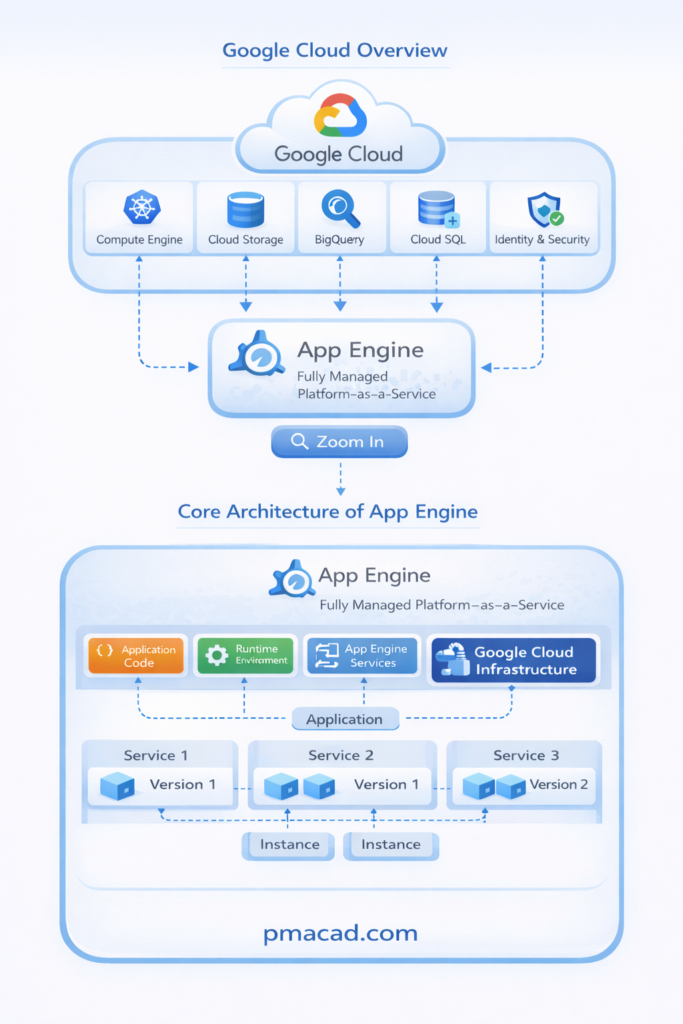
At a High Level, App Engine Architecture Consists of:
- Application code
Application code contains the business logic written by developers using supported programming languages. This code defines how requests are processed, data is handled, and responses are generated, forming the core functionality of an App Engine application. - Runtime environment
The runtime environment provides the language-specific execution context for application code. App Engine manages runtime versions, dependencies, and updates automatically, ensuring applications run securely and consistently without requiring developers to manage the underlying platform. - App Engine services
App Engine services include built-in features such as traffic management, scaling, task queues, cron jobs, and integrations with databases and storage. These services simplify application development by handling common operational tasks automatically. - Google Cloud infrastructure
Google Cloud infrastructure supplies the underlying compute, networking, and global load balancing. App Engine applications benefit from Google’s highly available, secure, and globally distributed infrastructure without needing direct infrastructure management.
Applications are deployed into services, which may have multiple versions, and each version can run multiple instances. This structure enables flexible deployments, traffic splitting, and high availability.
Key Architectural Concepts
- Application
An application is the top-level container that groups all related services within App Engine. It defines the project scope, shared configuration, and overall deployment environment for all application components. - Service
A service represents a logical component of an application, such as a frontend, backend, or API service. Each service can be developed, deployed, and scaled independently to support modular application design. - Version
A version is a specific deployment of a service, typically representing a code release. App Engine allows multiple versions to run simultaneously, enabling traffic splitting, testing, and easy rollback to previous deployments. - Instance
An instance is a running copy of a service version that handles incoming requests. App Engine automatically creates, scales, and terminates instances based on demand to ensure performance and availability.
5. App Engine Environments
App Engine provides two distinct environments:
5.1 Standard Environment
The App Engine Standard Environment runs applications in a secure, sandboxed runtime fully managed by Google. It offers fast startup times, automatic scaling, and built-in security. Developers have limited access to the operating system, making it ideal for stateless web applications and APIs with predictable runtime requirements.
Key Characteristics
- Extremely fast startup
- Automatic scaling
- Secure sandbox
- No access to underlying OS
- Free daily usage quota (limited)
Supported Languages
- Python
- Java
- Node.js
- Go
- PHP
- Ruby
The Standard Environment is ideal for stateless web applications with predictable runtime requirements.
5.2 Flexible Environment
The App Engine Flexible Environment runs applications inside Docker containers on Compute Engine virtual machines. It provides greater flexibility, allowing custom runtimes, background processes, and OS-level access. This environment is suitable for applications requiring specific dependencies, custom configurations, or long-running processes.
Key Characteristics
- Custom runtimes
- Access to OS-level features
- Longer startup time
- VM-based pricing
- Supports background processes
The Flexible Environment is suitable for applications requiring custom libraries, binaries, or OS-level control.
6. Runtime Environments
App Engine provides managed runtimes for popular programming languages. Developers specify the runtime in a configuration file, and Google provisions the environment automatically.
Example Runtimes
- Python runtime with Flask or Django
- Java runtime with Spring Boot
- Node.js runtime for APIs
- Go runtime for high-performance services
In the Flexible Environment, developers can also define custom Dockerfiles for full control.
7. Automatic Scaling and Load Balancing
One of the strongest features of Google Cloud App Engine is its built-in automatic scaling and load balancing, which allows applications to handle changing traffic demands without manual infrastructure management. App Engine continuously monitors application performance and automatically adjusts resources to ensure optimal availability, responsiveness, and cost efficiency. Developers do not need to provision servers or configure load balancers, as these capabilities are managed entirely by the platform.
How Scaling Works
- App Engine automatically adds or removes application instances based on real-time demand. Scaling decisions are driven by metrics such as incoming request rate, request latency, and CPU utilization. During traffic spikes, additional instances are created to maintain performance, while unused instances are removed during low demand to reduce costs. This process happens transparently, requiring no manual intervention from developers.
Types of Scaling
- Automatic scaling is fully managed and ideal for web applications with unpredictable traffic patterns.
- Basic scaling is designed for background processing or batch jobs, creating instances only when requests arrive.
- Manual scaling allows developers to specify a fixed number of instances for workloads that require consistent capacity or long-running processes.
App Engine provides automatic, global load balancing that distributes incoming requests across multiple application instances. It ensures high availability, prevents individual instances from becoming overloaded, and routes traffic efficiently without requiring manual configuration, allowing applications to remain responsive and reliable under varying traffic loads.
8. Built-in App Engine Services
App Engine integrates seamlessly with many Google Cloud services.
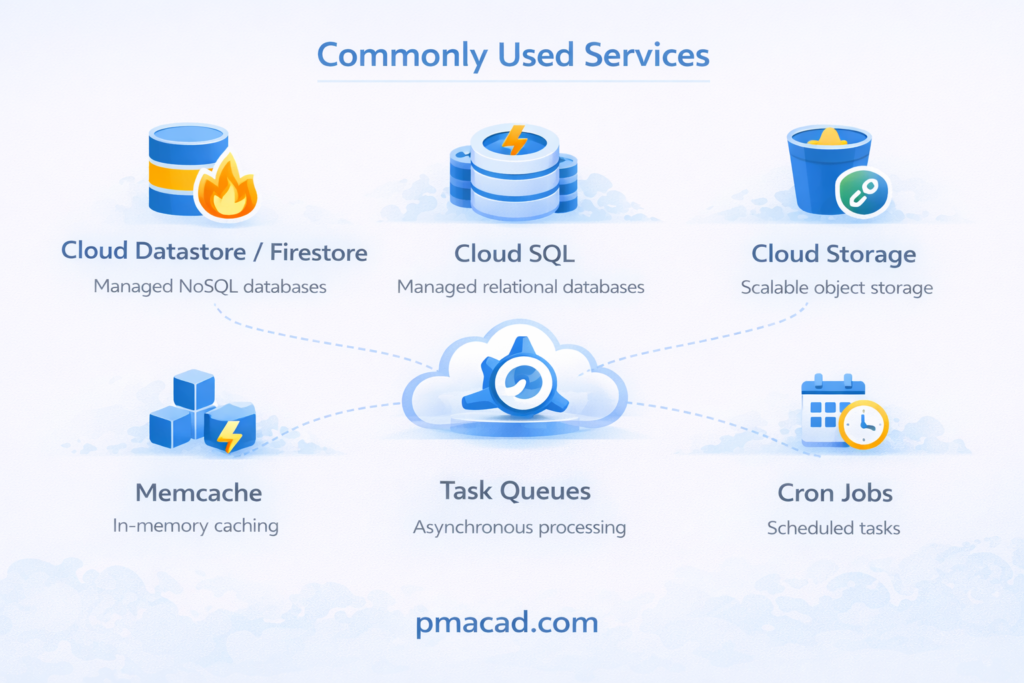
Commonly Used Services
- Cloud Datastore / Firestore
Cloud Datastore and Firestore provide fully managed NoSQL databases for App Engine applications. They support scalable, high-performance data storage with automatic replication, strong consistency options, and seamless integration for storing application data, user sessions, and metadata. - Cloud SQL
Cloud SQL is a fully managed relational database service supporting MySQL, PostgreSQL, and SQL Server. App Engine applications use Cloud SQL to store structured data, perform transactions, and manage relational schemas without handling database maintenance or infrastructure. - Cloud Storage
Cloud Storage offers durable, scalable object storage for unstructured data such as images, videos, backups, and static assets. App Engine integrates with Cloud Storage to serve content, store files securely, and support high availability across regions. - Memcache
Memcache is an in-memory caching service used to store frequently accessed data temporarily. It improves application performance and reduces database load by enabling fast retrieval of session data, query results, and commonly used objects. - Task Queues
Task Queues allow App Engine applications to perform asynchronous processing. They offload time-consuming or background tasks such as email sending or data processing, improving responsiveness and ensuring reliable execution through automatic retries. - Cron Jobs
Cron Jobs enable scheduled execution of tasks at predefined intervals. App Engine uses cron jobs for routine operations such as cleanup tasks, report generation, data synchronization, and periodic maintenance activities without manual intervention.
These services are accessible through APIs without additional infrastructure configuration.
9. Stateless Application Design
Google Cloud App Engine strongly encourages a stateless application design, which is a fundamental principle of cloud-native architecture. In a stateless design, application instances do not store user-specific or long-term data locally. Instead, each request is processed independently, allowing App Engine to scale applications seamlessly and manage instances dynamically without affecting application behavior.
What This Means
- In App Engine, local file storage is not used for persistent data. Any data written to an instance’s local filesystem is temporary and may be lost when the instance is restarted or terminated. As a result, persistent data must be stored in external services such as Cloud Storage, Cloud SQL, or Firestore.
- Stateless design also means there is no reliance on a single instance to maintain application state. Since App Engine may create or destroy instances at any time based on traffic demand, applications cannot assume that subsequent requests from the same user will reach the same instance.
- To manage user sessions, authentication, and shared data, applications use external services such as Firestore, Cloud SQL, Memcache, or Identity services. This ensures consistency and availability regardless of how many instances are running.
Benefits of Stateless Design
- Stateless applications offer better scalability because instances can be added or removed instantly without migrating state. This allows App Engine to handle sudden traffic spikes efficiently.
- They also provide fault tolerance, as failures of individual instances do not result in data loss or service disruption. Requests can be rerouted to healthy instances automatically.
- Finally, stateless design enables easy load balancing, since any instance can handle any request. This simplifies traffic distribution, improves reliability, and ensures consistent performance across all users.
Overall, stateless application design is a key reason App Engine delivers high availability, resilience, and effortless scaling.
10. Traffic Management and Versioning
Google Cloud App Engine provides powerful traffic management and versioning capabilities that allow developers to deploy, test, and update applications safely without disrupting users. These features make it possible to run multiple versions of an application simultaneously and control how user traffic is distributed between them. This flexibility is essential for maintaining application stability while delivering continuous improvements.
Key Capabilities
App Engine allows multiple versions per service, enabling developers to deploy new application releases without stopping existing ones. Older and newer versions can run side by side, which simplifies testing and rollback strategies.
With traffic splitting by percentage, developers can route a specific portion of incoming traffic to a new version. For example, 10% of users can be directed to a new release while 90% continue using the stable version.
Gradual rollouts allow traffic to be increased incrementally as confidence in the new version grows. If issues are detected, App Engine supports instant rollback, immediately redirecting traffic back to a stable version without redeploying code.
Deployment Strategies Enabled
These capabilities enable blue-green deployments, where two production-ready versions run in parallel and traffic is switched instantly.
They also support canary testing, which exposes new versions to a small subset of users for early feedback.
Additionally, A/B testing can be performed by routing different user segments to different versions, helping teams evaluate features, performance, and user experience before full release.
Together, these features make App Engine deployments safer, faster, and more reliable.
11. Security in App Engine
Security is built into Google Cloud App Engine by default, allowing developers to deploy applications with strong protections without designing complex security architectures. App Engine follows a shared responsibility model where Google secures the underlying infrastructure, operating systems, and platform services, while developers focus on securing application logic and access. This approach significantly reduces security risks and operational burden.
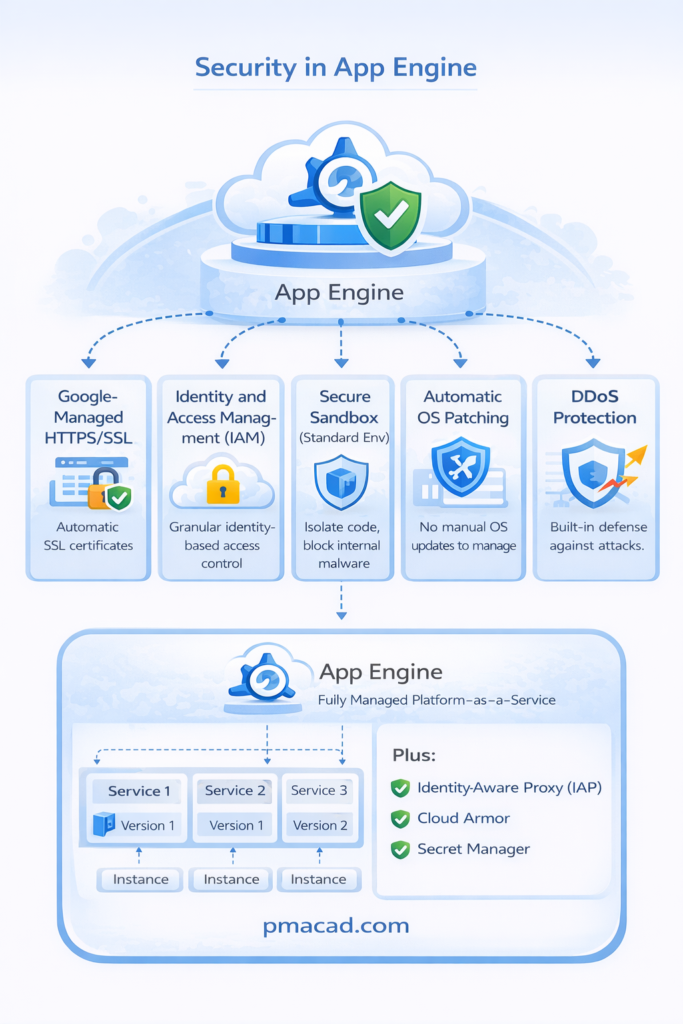
Built-in Security Features
- App Engine provides Google-managed SSL/TLS automatically, encrypting data in transit between users and applications. Developers do not need to configure certificates manually, ensuring secure communication by default.
- Identity and Access Management (IAM) controls who can deploy, manage, and access App Engine resources. IAM enforces role-based access and the principle of least privilege, reducing unauthorized access and improving governance.
- In the Standard environment, applications run inside a secure sandbox that isolates workloads from the underlying operating system and other applications. This sandbox prevents malicious code from accessing system resources or other tenants.
- App Engine also handles automatic OS and runtime patching, ensuring that security updates are applied promptly without developer intervention. This reduces exposure to vulnerabilities caused by outdated systems.
- Built-in DDoS protection leverages Google’s global network to absorb and mitigate large-scale attacks, helping applications remain available during traffic floods or malicious activity.
Integrated Security Services
- App Engine integrates seamlessly with Identity-Aware Proxy (IAP), which enables identity-based access to applications without relying on traditional network-based security. IAP ensures only authenticated and authorized users can access applications.
- Cloud Armor provides advanced protection against web attacks, including SQL injection, cross-site scripting, and malicious IP traffic, using customizable security policies and rules.
- Secret Manager allows applications to store and access sensitive data such as API keys, passwords, and credentials securely, avoiding hard-coded secrets and improving overall security posture.
- Together, these features make App Engine a secure-by-default platform suitable for enterprise and internet-facing applications.
12. Observability and Monitoring
Google Cloud App Engine integrates deeply with Google Cloud’s observability tools, providing developers with comprehensive visibility into application behavior, performance, and reliability. Observability is enabled by default, meaning applications automatically generate logs, metrics, and traces without requiring complex configuration. This helps teams monitor health, detect issues early, and troubleshoot problems efficiently in production environments.
Observability Features
- Automatic request logging captures detailed information about every incoming request, including request paths, response codes, latency, and client details. These logs help developers analyze traffic patterns, identify slow requests, and understand how users interact with the application.
- Error reporting automatically detects, groups, and tracks application errors and exceptions. Instead of manually searching logs, developers receive clear error summaries with stack traces, making it easier to diagnose and fix issues quickly.
- Metrics and dashboards provide real-time insights into application performance, such as request rates, instance usage, latency, and error rates. Prebuilt dashboards offer a visual overview of system health, while custom dashboards allow teams to track application-specific metrics.
- Distributed tracing follows requests as they travel through multiple services and components. This is especially valuable for microservices architectures, as it helps identify bottlenecks, slow dependencies, and performance issues across service boundaries.
Tools Used
- Cloud Monitoring collects and visualizes metrics, supports alerting, and enables proactive monitoring of application performance and availability.
- Cloud Logging centralizes logs from App Engine applications, making them searchable, filterable, and easy to analyze.
- Cloud Trace provides detailed latency analysis for distributed systems, helping optimize request performance.
- Error Reporting aggregates application errors and notifies teams when new or recurring issues occur.
13. CI/CD and DevOps with App Engine
App Engine fits naturally into modern DevOps workflows.
CI/CD Integration
- Cloud Build
- GitHub Actions
- Jenkins
- GitLab CI
Benefits
- Automated deployments
- Version-controlled releases
- Faster delivery cycles
- Reduced deployment errors
Deployments can be triggered automatically on code commits.
14. Cost Model and Pricing
App Engine follows a pay-as-you-use pricing model.
Cost Factors
- Instance hours
- Outbound network traffic
- Datastore usage
- Additional services
The Standard Environment includes a free daily quota, making it cost-effective for small applications and startups.
Cost optimization strategies include:
- Using automatic scaling
- Choosing appropriate instance classes
- Leveraging caching
15. Use Cases for App Engine
Web applications
App Engine is well suited for hosting web applications that require high availability, automatic scaling, and minimal infrastructure management. It handles traffic spikes efficiently and integrates with databases, storage, and security services, making it ideal for public-facing websites and SaaS platforms.
RESTful APIs
App Engine is commonly used to build and deploy RESTful APIs that serve web and mobile clients. Its automatic scaling, load balancing, and built-in security ensure APIs remain responsive and reliable even under fluctuating request volumes.
Mobile app backends
App Engine provides a scalable backend for mobile applications, handling authentication, data storage, business logic, and API endpoints. It integrates easily with Firebase and other Google Cloud services, supporting real-time data access and rapid mobile application development.
Event-driven applications
App Engine supports event-driven architectures by integrating with services like Cloud Tasks, Pub/Sub, and Cron Jobs. Applications can respond automatically to events such as HTTP requests, scheduled tasks, or background jobs without managing servers or infrastructure.
Internal enterprise tools
Enterprises use App Engine to build internal dashboards, workflows, and business tools. Its built-in security, IAM integration, and managed environment make it suitable for internal applications that require controlled access, reliability, and quick deployment.
Rapid prototypes and MVPs
App Engine is ideal for rapid prototyping and minimum viable products (MVPs). Developers can deploy applications quickly without infrastructure setup, iterate fast, and scale automatically as user demand grows, making it perfect for startups and innovation teams.
16. App Engine vs Anthos vs Cloud Run vs Compute Engine vs GKE
App Engine is a fully managed Platform as a Service (PaaS) designed to abstract away almost all infrastructure concerns so developers can focus purely on application logic. It provides built-in services such as automatic scaling, load balancing, traffic splitting, logging, and monitoring, all tightly integrated into the platform. App Engine supports standard runtimes (like Python, Java, Node.js, Go) with strong conventions, which makes it ideal for rapid development and traditional web applications. However, this convenience comes with trade-offs: less control over the runtime environment, some constraints on background processing and system access, and potentially higher costs at scale. App Engine is best suited for teams that value simplicity, predictable patterns, and minimal operational overhead.
Cloud Run is a fully managed container execution environment that runs stateless containers on demand. It gives developers much more flexibility by allowing any language, framework, or custom runtime—as long as it’s packaged in a container. Cloud Run scales from zero to high traffic automatically and charges only for actual usage, making it cost-efficient for spiky or unpredictable workloads. Compared to App Engine, it offers greater control and portability (containers can run elsewhere), but requires more responsibility for building and maintaining container images. Cloud Run is ideal for modern microservices, APIs, and event-driven workloads where flexibility and efficiency matter most.
Anthos, on the other hand, is a hybrid and multi-cloud application management platform built on Kubernetes. It is designed for organizations running complex, distributed systems across on-premises data centers and multiple cloud providers. Anthos provides a consistent way to deploy, manage, and secure containerized applications using Kubernetes, service mesh, and centralized policy management. Unlike App Engine, Anthos offers deep control over infrastructure, networking, and workloads, making it suitable for large enterprises with strict compliance, legacy systems, or hybrid-cloud strategies. However, this power comes with higher complexity and operational overhead. Anthos is best suited for organizations that need flexibility, portability, and centralized governance across environments, rather than simplicity and rapid deployment.
| Aspect | App Engine | Anthos | Cloud Run | Compute Engine | Google Kubernetes Engine |
|---|
| Service Type | Platform as a Service (PaaS) | Hybrid & multi-cloud application platform | Serverless container platform. Serverless Platform as a Service (PaaS) | Infrastructure as a Service (IaaS) | Container orchestration platform (Container as a Service (CaaS) |
| Primary Purpose | Run applications with minimal ops | Manage and modernize apps across environments | Run stateless containers on demand | Run virtual machines with full control | Run and orchestrate containerized apps |
| Deployment Model | Google Cloud only | On-prem, Google Cloud, multi-cloud | Google Cloud only | Google Cloud only | Google Cloud (with hybrid via Anthos) |
| Runtime Flexibility | Limited to supported runtimes | Very high (Kubernetes-based) | Very high (any container) | Unlimited (any OS/software) | High (any container/runtime) |
| Container Support | Limited / optional | Native (Kubernetes) | Native and required | Optional (user-managed) | Native and core |
| Infrastructure Control | Very low | High | Low to medium | Very high | Medium to high |
| Scaling | Fully automatic | Kubernetes-based (manual + auto) | Automatic, scale to zero | Manual or autoscaling groups | Kubernetes autoscaling |
| Target Users | App developers | Platform, DevOps, SRE teams | App & microservice developers | Infra, DevOps, system admins | DevOps, SRE, platform teams |
| Use Cases | Web apps, APIs, rapid dev | Enterprise modernization, hybrid cloud | APIs, microservices, event-driven apps | Legacy apps, custom systems | Microservices, platforms, stateful apps |
| Portability | Low | Very high | High (container portable) | Low | High |
| Operational Complexity | Minimal | High | Low | High | Medium to high |
| Cost Model | Pay per app resource usage | Licensing + infra costs | Pay per request & compute time | Pay per VM, storage, network | Pay for clusters, nodes, usage |
| Best Fit | Simple apps with fast iteration | Large enterprises with complex needs | Modern cloud-native workloads | Full control and customization | Teams needing Kubernetes control without DIY ops |
17. Advantages of Google Cloud App Engine
No server management
App Engine completely removes the need to provision, configure, or maintain servers. Google manages infrastructure, operating systems, patching, and availability, allowing developers to focus entirely on writing application code and delivering features instead of handling operational tasks.
Automatic scaling
App Engine automatically scales applications up or down based on incoming traffic and resource usage. It dynamically creates or removes instances to handle demand, ensuring consistent performance during traffic spikes while reducing costs during low-usage periods.
Built-in high availability
Applications deployed on App Engine run on Google’s globally distributed infrastructure. Built-in redundancy, load balancing, and failover mechanisms ensure applications remain available even during hardware failures or traffic surges, without requiring complex architecture design.
Strong security defaults
App Engine includes security features by default, such as managed SSL/TLS, secure runtime isolation, automatic patching, IAM-based access control, and DDoS protection. These defaults reduce security risks and minimize the effort required to protect applications.
Fast development cycles
By eliminating infrastructure setup and management, App Engine enables rapid development and deployment. Developers can push code quickly, test new versions easily, and roll back changes instantly, significantly accelerating release cycles and innovation.
Deep Google Cloud integration
App Engine integrates seamlessly with Google Cloud services such as Cloud SQL, Firestore, Cloud Storage, Monitoring, Logging, and IAM. This tight integration simplifies application architecture and enables developers to build feature-rich, scalable applications efficiently.
18. Limitations and Considerations
Less control over infrastructure
App Engine abstracts infrastructure management, which limits control over operating systems, networking, and low-level configuration. While this simplifies operations, it may not suit applications requiring fine-grained infrastructure tuning, custom networking setups, or specialized hardware configurations.
Runtime limitations in the Standard environment
The Standard environment supports predefined runtimes with sandbox restrictions. Developers cannot install arbitrary system libraries or access the underlying operating system, which may limit compatibility for applications requiring custom dependencies or native binaries.
Not ideal for stateful workloads
App Engine is designed for stateless applications. Local file storage is temporary, and instances can be created or destroyed at any time. Applications that rely on local state or persistent in-memory data must be redesigned to use external storage services.
Potential vendor lock-in
App Engine uses platform-specific abstractions and services that may reduce portability. Migrating applications to other platforms can require refactoring, especially when heavily relying on App Engine-specific APIs or managed services.
Higher cost at large scale compared to containers
For very high-throughput or long-running workloads, App Engine can become more expensive than container-based solutions like Cloud Run or GKE. Organizations may need to evaluate cost trade-offs as applications scale significantly.

Sumit is the creator & author at pmacad.com, where he writes about project management, technology, and modern delivery practices. He brings over a decade of experience across technology projects and delivery leadership.