Cloud Run is a fully managed serverless platform that allows developers to run containerized applications without managing servers or infrastructure. Part of the broader Google Cloud ecosystem, Cloud Run combines the flexibility of containers with the simplicity of serverless computing. It is designed for teams that want to focus on building applications rather than provisioning, scaling, or maintaining compute resources. With Cloud Run, developers package their application into a container, deploy it, and let the platform handle everything else—from scaling to availability.
At its core, Cloud Run is built around stateless HTTP-driven workloads. Each service responds to incoming requests and can scale automatically from zero instances to thousands, depending on demand. This makes it particularly attractive for APIs, microservices, web backends, and event-driven workloads. Unlike traditional platform-as-a-service offerings, Cloud Run does not constrain developers to a fixed runtime or framework. If it can run in a container, it can run on Cloud Run.
How Cloud Run Works
Cloud Run operates on a simple yet powerful model. Developers build a container image that listens for HTTP requests on a specified port. This image is stored in a container registry and deployed as a Cloud Run service. Once deployed, Cloud Run handles incoming traffic by routing requests to container instances, scaling the number of instances up or down automatically.
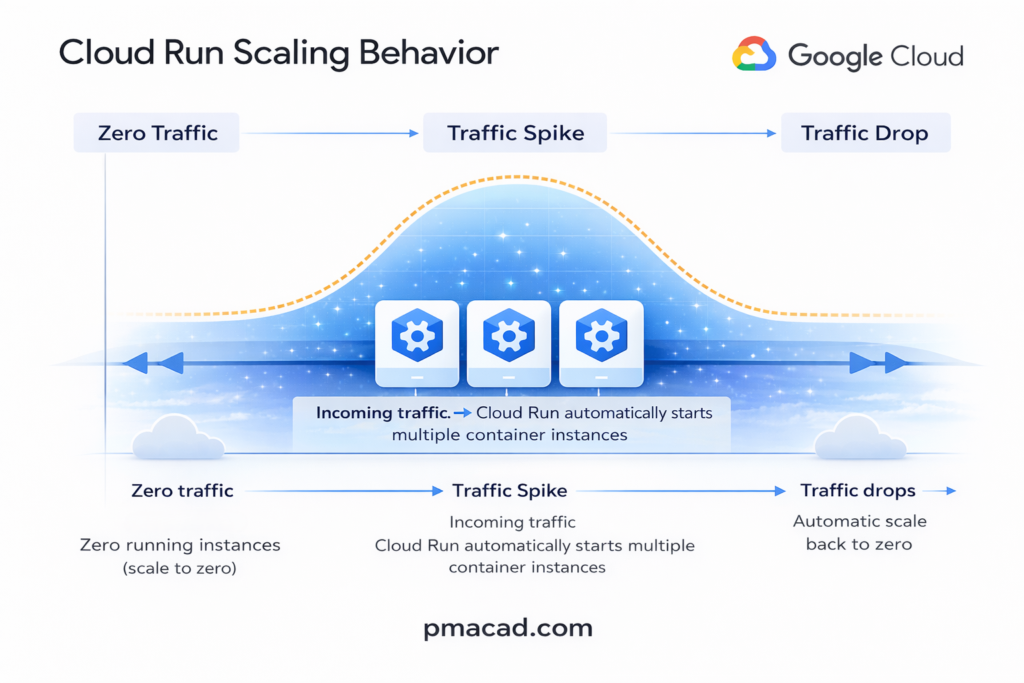
One of Cloud Run’s defining characteristics is scale-to-zero. When no requests are being processed, Cloud Run can reduce the number of running instances to zero, meaning there is no cost for idle resources. When traffic returns, new instances are started automatically. This behavior makes Cloud Run especially cost-effective for applications with intermittent or unpredictable traffic patterns.
Cloud Run also enforces statelessness. Each request should be independent, and any persistent data must be stored externally using managed services such as databases or object storage. This design aligns well with modern cloud-native application architectures.
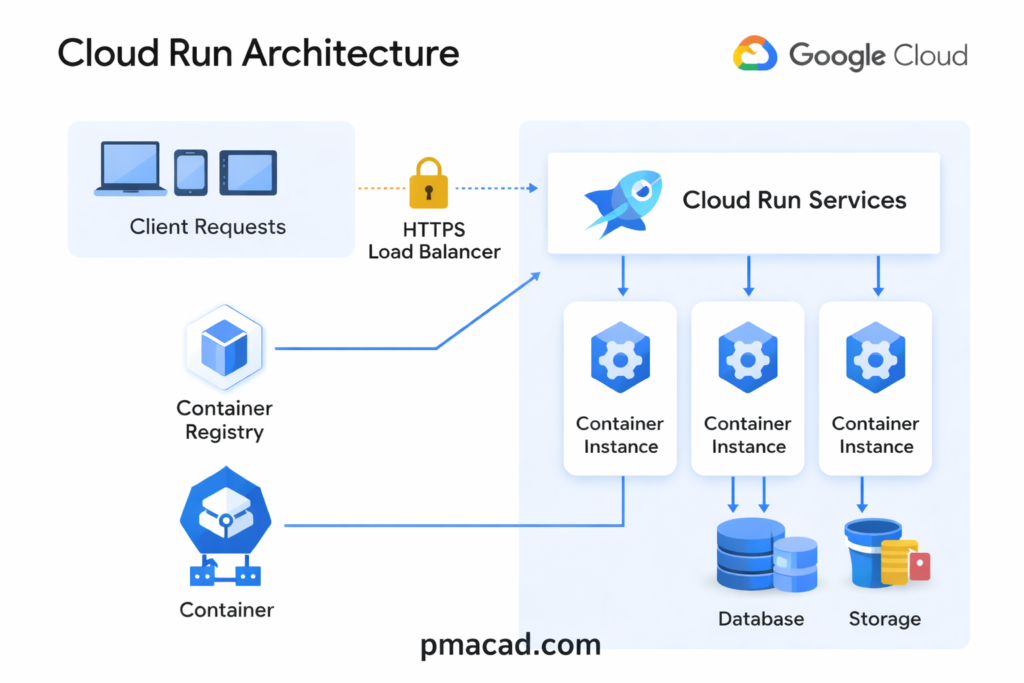
Client requests originate from browsers, mobile apps, or other services. These requests are sent over HTTPS and first reach Google’s managed HTTPS Load Balancer, which provides secure entry, automatic TLS termination, and global traffic routing. The user does not configure or manage this layer and it is fully handled by the platform.
The load balancer forwards requests to Cloud Run Services. A Cloud Run service represents a deployed container application along with its configuration, such as concurrency, memory, and scaling rules. Cloud Run determines how many container instances are required based on incoming traffic.
Each request is then processed by one of the container instances. These instances are created on demand and can scale up or down automatically. When traffic increases, Cloud Run starts more instances; when traffic drops to zero, all instances can shut down. Multiple requests can be handled by a single instance depending on concurrency settings.
The container images used by these instances are pulled from the Container Registry. This registry stores the application’s container image that developers build and deploy. Cloud Run fetches the image automatically when new instances are started.
Since Cloud Run enforces stateless execution, containers interact with external services for persistence. Application data is stored outside the container lifecycle, ensuring scalability and reliability.
Key Features and Capabilities
Cloud Run offers a rich set of features that make it suitable for both small projects and large-scale production systems.
Cloud Run supports any language or framework as long as the application is packaged as a container. This removes runtime restrictions and allows teams to use existing tools, libraries, and custom system dependencies.
Applications scale automatically and instantly, from zero to thousands of instances, based purely on incoming requests, ensuring both performance during traffic spikes and zero cost during idle periods.
A major feature of Cloud Run is pay-per-use pricing. You are billed only for the CPU, memory, and execution time consumed while requests are being handled, making it highly cost-efficient for unpredictable or spiky workloads. Cloud Run also supports high request concurrency, allowing a single container instance to handle multiple requests simultaneously, which further optimizes cost.
Security is built in by default. Services run over HTTPS, integrate with IAM for authentication and authorization, and can be made private without exposing public endpoints. Cloud Run also offers traffic splitting and revision management, enabling safe rollouts, canary deployments, and quick rollbacks.
Development Flexibility with Containers
- One of the biggest advantages of Cloud Run is its support for containers. Containers provide a consistent runtime environment from development through production. Developers can use any programming language, framework, or system library, as long as it is packaged in a container image. This flexibility makes Cloud Run appealing to teams migrating existing applications or experimenting with new technologies.
- Because Cloud Run is based on standard container technologies, applications deployed there are portable. The same container image can be run locally, in a different cloud environment, or on a Kubernetes cluster. This reduces vendor lock-in and gives organizations more strategic flexibility over time.
- However, with flexibility comes responsibility. Developers must build and maintain their container images, including managing dependencies, security updates, and image sizes. While this adds some complexity compared to fully abstracted platforms, many teams find the trade-off worthwhile for the control it provides.
Event-Driven and Asynchronous Workloads
- Cloud Run is not limited to traditional web applications. It integrates well with event-driven architectures. Services can be triggered by HTTP requests from other systems, scheduled jobs, or events emitted by other cloud services. This makes Cloud Run a strong choice for background processing, data transformation, and lightweight automation tasks.
- Because Cloud Run instances are ephemeral, long-running background jobs must be carefully designed. Tasks should be broken into smaller units of work or coordinated using external systems such as message queues or task schedulers. When designed correctly, this approach results in highly scalable and resilient systems.
Pricing and Cost Efficiency
- Cloud Run’s pricing model is based on actual usage rather than pre-allocated resources. Charges are calculated based on the amount of CPU, memory, and request time consumed while a container instance is actively handling requests. When no requests are being processed, there is no cost for compute resources.
- This pay-per-use model can lead to significant cost savings, especially for workloads with variable traffic. For startups and small teams, it removes the need to pay for idle capacity. For larger organizations, it enables more efficient resource utilization and clearer cost attribution per service.
- That said, costs can increase if services are not tuned properly. High concurrency settings, inefficient code, or overly large container images can lead to unnecessary resource consumption. Monitoring and optimization remain important, even in a serverless environment.
Use Cases and Ideal Scenarios
- Cloud Run excels in scenarios where rapid development, scalability, and flexibility are priorities. Common use cases include REST and GraphQL APIs, microservices architectures, web applications, and internal tools. It is also well suited for prototypes and proof-of-concept projects, where infrastructure overhead would otherwise slow progress.
- For organizations adopting microservices, Cloud Run provides a simpler alternative to managing container orchestration platforms. Teams can deploy independently, scale automatically, and iterate quickly without deep operational expertise. This makes Cloud Run particularly attractive for development teams that want to move fast while maintaining reliability.
Cloud Run Limitations & Considerations
Despite its strengths, Cloud Run is not a universal solution. Its stateless design means it is not suitable for applications that require persistent local storage or long-lived in-memory state. Cold starts, while generally fast, can still introduce latency for infrequently used services. Applications with strict real-time requirements may need careful tuning or alternative approaches.
Additionally, while Cloud Run abstracts away infrastructure, it does not eliminate the need for good system design. Observability, error handling, and security practices remain essential. Developers must still think in terms of distributed systems and failure modes.
Cloud Run vs GKE
Cloud Run is an automated, fully managed service for running containers where almost all operational responsibility is handled by the platform. You provide a container image, and Cloud Run takes care of provisioning servers, scaling instances up and down, routing traffic, securing endpoints, and even scaling to zero when the service is idle. Developers do not manage clusters, nodes, or orchestration concepts. The platform enforces a stateless, request-driven execution model, which makes Cloud Run ideal for APIs, web services, and event-driven workloads. In short, Cloud Run abstracts infrastructure completely so teams can focus only on application code.
Cloud Run is a serverless Platform as a Service (PaaS). You never see or manage virtual machines, clusters, or operating systems. You only deploy containers and define a few runtime settings. All infrastructure decisions such as VMs, scaling, load balancing, are completely hidden and automated. From the user’s perspective, Cloud Run operates at the application level, not the infrastructure level.
Google Kubernetes Engine (GKE), on the other hand, gives you a managed Kubernetes environment but still requires significant hands-on work. While Google manages the Kubernetes control plane, users are responsible for designing clusters, managing nodes, configuring networking, storage, security policies, and handling application orchestration. GKE offers far more flexibility and control than Cloud Run, supporting stateful workloads, complex service meshes, and long-running processes. This power comes at the cost of operational complexity, making GKE better suited for teams with Kubernetes expertise or applications that need deep customization.
Google Kubernetes Engine (GKE) is not IaaS, but it is closer to it. GKE is best described as Container as a Service (CaaS) or a managed orchestration layer. While Google manages the Kubernetes control plane, you still work with nodes (VMs), clusters, networking, and storage. You make infrastructure-related decisions, just not at the raw VM level. Underneath, GKE itself runs on IaaS resources like Compute Engine.
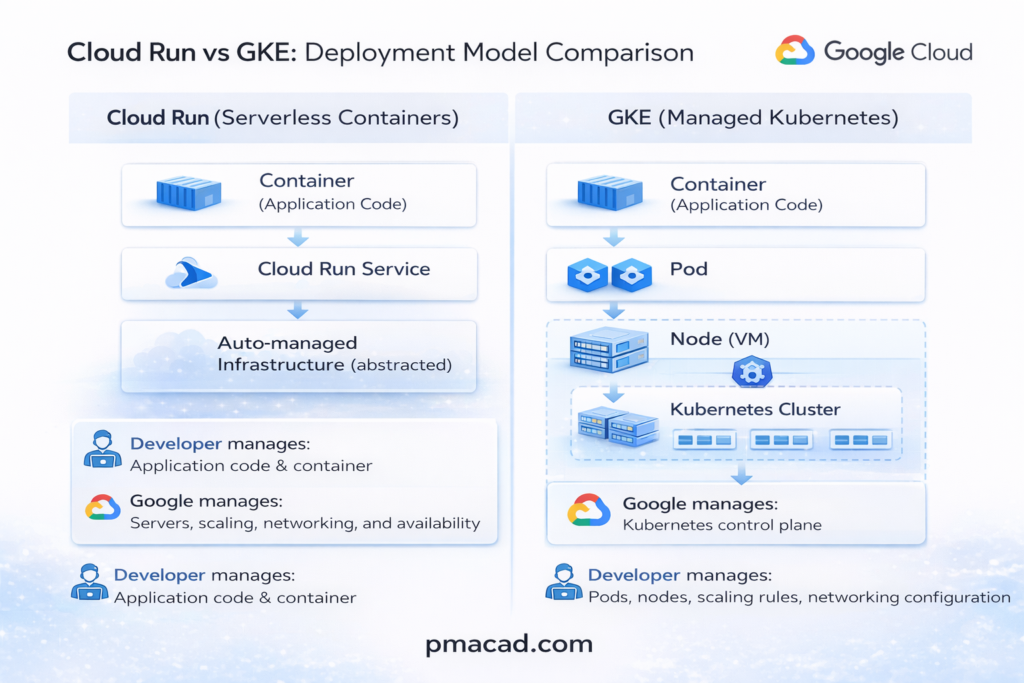
In essence, Cloud Run is automation-first, while GKE is control-first. Cloud Run is “containers without infrastructure thinking,” whereas GKE is “containers with full responsibility and flexibility
1. Fundamental Differences
- Cloud Run is a serverless container platform. You deploy a container, and Google handles servers, scaling, networking, and availability.
- Google Kubernetes Engine (GKE) is a managed Kubernetes service. You run and manage Kubernetes clusters, even though Google manages the control plane.
- Cloud Run prioritizes simplicity and abstraction; GKE prioritizes control and customization.
- Cloud Run enforces stateless, request-driven workloads. GKE supports stateful and long-running workloads.
2. How They Differ in Working
- Cloud Run runs containers only when requests arrive and can scale down to zero. GKE runs containers on always-on nodes unless you explicitly configure autoscaling.
- Cloud Run hides orchestration entirely; you never see pods, nodes, or clusters. GKE exposes full Kubernetes concepts like pods, services, ingress, config maps, and Helm.
- Cloud Run has limited configuration knobs; GKE allows deep tuning of networking, security, storage, and scheduling. Deploying to Cloud Run is fast and simple; GKE requires cluster planning and lifecycle management.
3. Use Case Differences
- Cloud Run is ideal for:
- APIs and microservices
- Web backends
- Event-driven workloads
- Spiky or unpredictable traffic
- Teams wanting minimal DevOps effort
- GKE is ideal for:
- Complex microservice platforms
- Stateful applications
- Long-running background jobs
- Custom networking or security needs
- Organizations already standardized on Kubernetes
4. Why They Look Similar
- Both run containers, making them appear interchangeable.
- Both support autoscaling and integrate with Google Cloud services.
- Cloud Run is actually built on Kubernetes under the hood, but Kubernetes is completely hidden.
- Marketing often positions both as “container platforms,” blurring the distinction.
- Developers familiar with Docker may assume both require the same operational effort.
Cloud Run vs GKE vs App Engine Sample Use Cases
Use Case 1: Public API with Spiky Traffic : Cloud Run
- A REST or GraphQL API that experiences unpredictable traffic spikes, such as a mobile backend or partner integration.
- Cloud Run is ideal because it scales automatically from zero to high traffic without pre-provisioning resources.
- You pay only when requests are processed, making it cost-efficient for bursty workloads.
- Containers allow full flexibility in language, framework, and dependencies.
This same API could run on GKE, but would require managing autoscaling, nodes, and idle capacity. On App Engine, runtime and dependency restrictions may limit flexibility.
Use Case 2: Complex Microservices Platform: GKE
- A large system composed of many interdependent services, some stateful, with custom networking and security requirements.
- GKE is suitable because it provides full Kubernetes control, supporting service meshes, persistent volumes, and long-running workloads.
- Teams can fine-tune scaling, resource allocation, and deployment strategies.
- Best for organizations with strong DevOps or Kubernetes expertise.
This platform would be difficult on Cloud Run due to stateless constraints and limited orchestration control. App Engine would be too opinionated and restrictive for complex service topologies.
Use Case 3: Traditional Web Application : App Engine
- A classic web application with predictable traffic and a standard runtime (e.g., Python, Java, Node.js).
- App Engine works well because it provides managed runtimes, built-in scaling, and minimal operational overhead.
- Developers focus on application logic while the platform handles infrastructure concerns.
- Suitable for teams prioritizing stability and speed over customization.
This app could run on Cloud Run, but containers may add unnecessary complexity. Running it on GKE would be excessive unless future scaling or architectural changes are planned.
Traditional PaaS vs Serverless PaaS
Traditional PaaS gives you a managed application platform, but servers still exist and stay running. You deploy your code (or app package), choose a runtime, and the platform manages the OS, patching, and basic scaling. However, you usually decide instance sizes, minimum instance counts, and scaling rules. Resources are provisioned ahead of time and often billed even when idle. Scaling is automatic, but not instantaneous, and applications typically assume continuously running instances. Examples include classic app platforms where apps are always “on,” even during low traffic. Traditional (Normal) PaaS —> servers exist, just managed for you
These platforms manage the OS, runtime, and scaling, but apps are always running and you usually configure instance counts or sizes.
- Google App Engine (Standard & Flexible)
Managed runtimes with automatic scaling, but apps stay deployed and don’t scale to zero by default.- Azure App Service
Web apps and APIs with managed infrastructure, but underlying instances are continuously allocated.- Heroku
Simple deployment model using dynos that remain active and are billed while running.- AWS Elastic Beanstalk
Abstracts EC2 and autoscaling, but servers still run even during idle periods.Best for: traditional web apps, long-running services, predictable traffic, minimal container work.
Serverless PaaS goes a step further by removing servers from both management and mental models. You don’t provision instances, choose machine sizes, or keep anything running. The platform starts execution only when requests arrive and can scale down to zero when idle. Billing is based on actual execution time and resources consumed per request. Applications are designed to be stateless and event-driven, with infrastructure fully abstracted. You think in terms of services and requests, not instances and capacity. Serverless PaaS —> no servers, no idle cost
These platforms execute code or containers only when triggered and scale down to zero automatically.
- Cloud Run
Runs containers on demand with request-based scaling and pay-per-use pricing.- AWS Lambda
Function-based execution triggered by events, billed per execution time.- Azure Functions
Event-driven functions with automatic scaling and no always-on infrastructure.- Vercel
Serverless deployment for web apps and APIs with instant scaling.Best for: APIs, microservices, event-driven workloads, spiky traffic, cost optimization.
Conclusion
Cloud Run represents a modern approach to application deployment, blending the power of containers with the simplicity of serverless computing. By removing the burden of infrastructure management while preserving flexibility and portability, it enables developers to focus on what matters most: delivering value through software. For teams building scalable, cloud-native applications, Cloud Run offers a compelling balance of control, efficiency, and ease of use.

Sumit is the creator & author at pmacad.com, where he writes about project management, technology, and modern delivery practices. He brings over a decade of experience across technology projects and delivery leadership.