Introduction
In today’s fast-paced digital environment, businesses demand scalable, cost-efficient, and low-maintenance infrastructure solutions. Serverless computing has emerged as a transformative model, allowing developers to build and deploy applications without managing servers. One of the leading offerings in this space is Google Cloud Functions, a fully managed serverless execution environment provided by Google Cloud.
Google Cloud Functions enables developers to write small, single-purpose functions that respond to events without provisioning or managing servers. With automatic scaling, pay-per-use pricing, and seamless integration with other Google Cloud services, it has become a popular choice for building modern cloud-native applications.
What Are Google Cloud Functions?
Google Cloud Functions is an event-driven serverless compute platform that allows you to execute code in response to specific triggers. Instead of deploying a full application or managing virtual machines, developers write discrete functions that perform a particular task. These functions are executed in response to events such as:
- HTTP requests
- Changes in Cloud Storage
- Pub/Sub messages
- Database updates
- Authentication events
The platform abstracts infrastructure management, allowing teams to focus solely on writing business logic.
Core Features
1. Fully Managed Infrastructure
Google Cloud Functions removes the complexity of managing servers, operating systems, and runtime environments. Google handles provisioning, patching, scaling, and monitoring. Developers only need to upload their code and define triggers.
2. Automatic Scaling
Cloud Functions automatically scale up or down depending on incoming traffic. If your function receives thousands of requests per second, Google Cloud provisions additional instances automatically. When traffic decreases, resources scale down to zero, helping minimize costs.
3. Event-Driven Execution
One of the most powerful features is its event-driven architecture. Functions execute only when triggered by an event, making it ideal for microservices and reactive systems.
4. Pay-Per-Use Pricing
With Cloud Functions, you pay only for the compute time consumed during execution. Billing is based on:
- Number of invocations
- Execution time
- Memory allocated
- Outbound networking
This cost model is particularly beneficial for applications with unpredictable or low traffic.
5. Multiple Language Support
Google Cloud Functions supports several programming languages, including:
- Node.js
- Python
- Go
- Java
- .NET
- Ruby
- PHP
This flexibility allows teams to work in languages they are already comfortable with.
Architecture
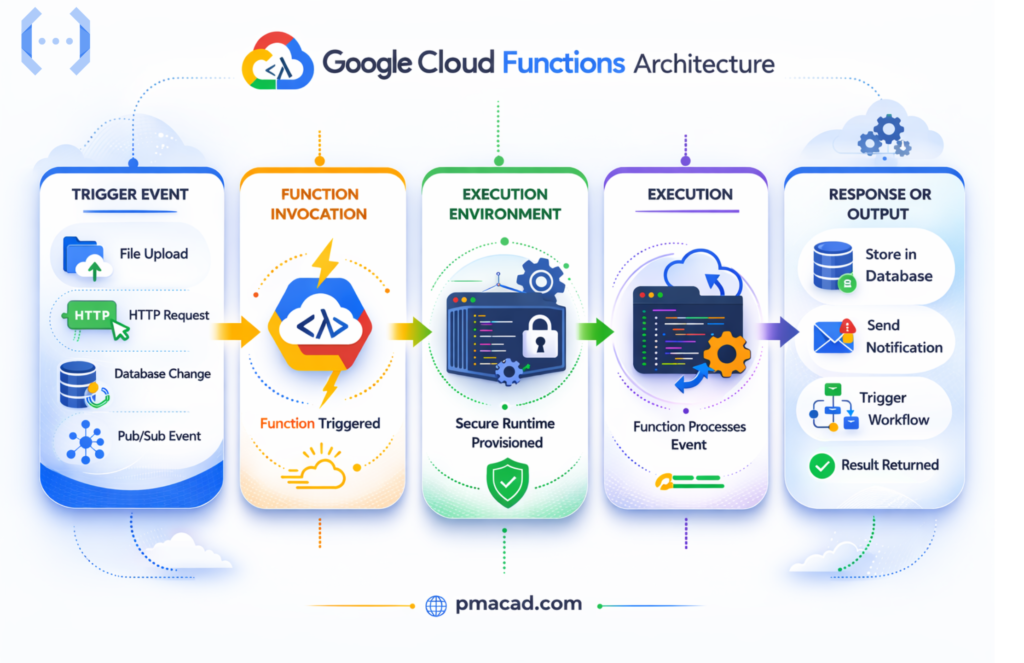
At its core, Google Cloud Functions operates on an event-driven model:
1. Trigger Event
Cloud Functions follows an event-driven architecture where execution begins when a specific event occurs. This could include an HTTP request, file upload to Cloud Storage, database update, or message publication.
2. Function Invocation
Once the event is detected, Google Cloud automatically invokes the corresponding function. The triggering mechanism connects the event source to the function, ensuring real-time, automatic execution without manual intervention or scheduling.
3. Execution Environment
Google provisions a secure, isolated runtime environment for each function execution. This managed container includes the selected programming language runtime and necessary dependencies, abstracting infrastructure management from developers.
4. Execution
The function runs its defined logic, processing input data provided by the event. It can perform computations, interact with databases, call external APIs, or trigger additional cloud services as needed.
5. Response or Output
After processing, the function returns a response for HTTP triggers or stores output in connected services. Results may be written to databases, sent as messages, or used to initiate downstream workflows.
Below are five common event sources for Google Cloud Functions in Google Cloud:
- HTTP Requests
Cloud Functions can be triggered directly by HTTP or HTTPS requests, making them ideal for building REST APIs, webhooks, and lightweight backend services accessible from browsers or external systems. - Cloud Pub/Sub
Functions can subscribe to Pub/Sub topics and execute automatically when messages are published, enabling real-time event processing, asynchronous workflows, and decoupled microservices architectures. - Cloud Storage
When files are uploaded, deleted, or modified in Cloud Storage buckets, functions can trigger automatically to process images, validate uploads, transform data, or initiate downstream workflows. - Firestore (Database Events)
Changes in Firestore documents—such as creation, updates, or deletions—can trigger functions, supporting real-time applications, notifications, auditing systems, and automated data synchronization processes. - Cloud Audit Logs
Administrative or system-level events recorded in Cloud Audit Logs can trigger functions, enabling security monitoring, compliance enforcement, automated remediation, and infrastructure governance across projects.
Common Use Cases
1. API Backends
Cloud Functions can serve as lightweight RESTful APIs. HTTP-triggered functions handle requests without the need for a full web server.
2. Real-Time File Processing
When a file is uploaded to Cloud Storage, a function can automatically:
- Resize images
- Convert formats
- Extract metadata
- Validate uploads
3. Data Processing Pipelines
By subscribing to Pub/Sub topics, functions can process streaming data in real time, enabling analytics workflows and event-driven pipelines.
4. Authentication Hooks
Functions can respond to user authentication events, sending welcome emails or logging user activity.
5. Scheduled Tasks
Using Cloud Scheduler, developers can trigger functions at predefined intervals for tasks such as database cleanup or reporting.
Development and Deployment Workflow
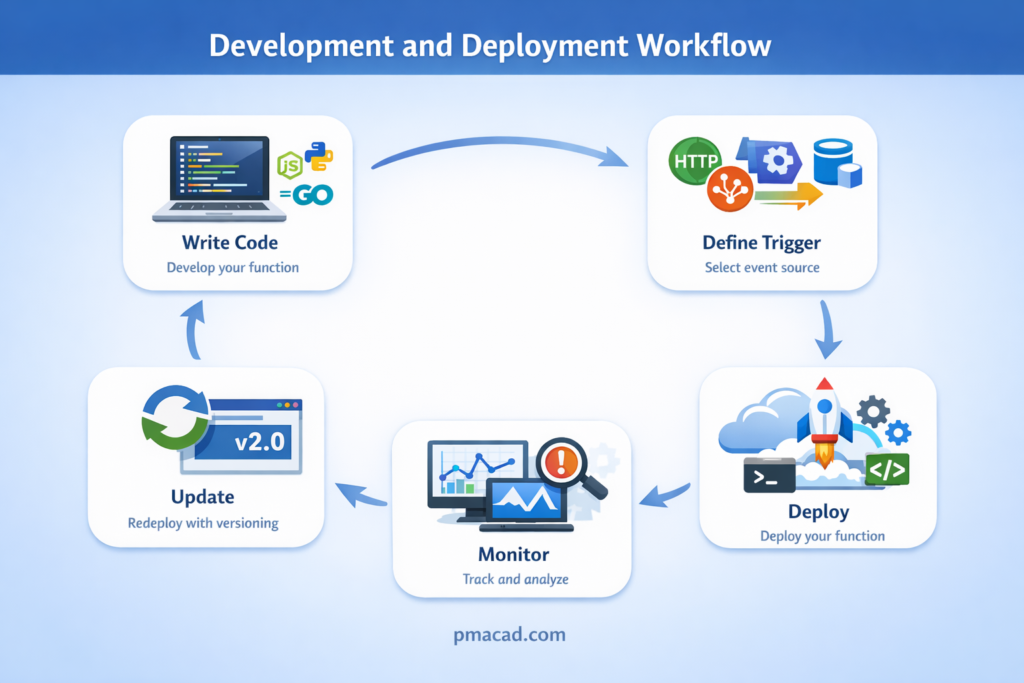
Building and operating applications with Google Cloud Functions follows a streamlined, developer-friendly workflow designed for speed and scalability. Instead of managing servers or infrastructure, teams focus purely on writing business logic while Google handles provisioning and scaling behind the scenes. From initial development to continuous improvement, the lifecycle of a cloud function involves several structured steps that ensure reliable deployment, observability, and ongoing optimization. The following workflow outlines the key stages involved in developing, deploying, monitoring, and updating your Cloud Functions efficiently.
- Write Code – Develop your function in your preferred language.
- Define Trigger – Choose HTTP, Pub/Sub, Storage, or another event source.
- Deploy – Use the Google Cloud Console, CLI, or CI/CD pipelines.
- Monitor – Use Cloud Logging and Cloud Monitoring tools.
- Update – Redeploy with versioning support.
Developers often use Infrastructure as Code tools such as Terraform to manage function deployments in production environments
Cloud Functions vs Cloud Run
Google Cloud Functions is a fully managed, event-driven serverless platform designed for executing small, single-purpose functions. It automatically scales based on incoming events such as HTTP requests, Pub/Sub messages, or Cloud Storage changes. Developers focus only on writing code, while infrastructure provisioning and scaling are handled by Google. It is ideal for lightweight tasks, background processing, and microservices that respond to specific triggers. With a simple deployment model and pay-per-use pricing, Cloud Functions works best for applications that do not require full control over the runtime environment or complex container configurations.
Google Cloud Run is a fully managed platform for running containerized applications in a serverless environment. Unlike Cloud Functions, it allows developers to deploy any container image, giving full control over dependencies, runtime, and application architecture. Cloud Run supports higher concurrency and is well-suited for APIs, web applications, and complex microservices. It scales automatically and can handle long-running processes, making it more flexible than Cloud Functions for applications requiring customization or advanced configuration.
| Feature | Cloud Functions | Cloud Run |
|---|---|---|
| Deployment Model | Function-based | Container-based |
| Complexity | Simple | More flexible |
| Use Case | Small, event-driven tasks | Full applications or microservices |
| Runtime Control | Limited | Full container control |
Cloud Functions is ideal for lightweight tasks, while Cloud Run is better suited for containerized applications with more complex requirements.
Advantages
Rapid Development
Developers can build and deploy functions quickly without provisioning or configuring servers. This accelerates development cycles, enables faster experimentation, and allows teams to focus entirely on writing business logic rather than infrastructure management.
Reduced Operational Overhead
With Cloud Functions, there is no need to manage servers, operating systems, clusters, or patching schedules. Google automatically handles scaling, maintenance, and updates, significantly reducing administrative workload and operational complexity.
High Availability
Built on Google’s global infrastructure, Cloud Functions benefits from automatic scaling, redundancy, and regional distribution. This ensures reliable performance, fault tolerance, and low latency for applications serving users across different geographic locations.
Seamless Integration
Cloud Functions integrates natively with other Google Cloud services such as Cloud Storage, Pub/Sub, and Firestore. This tight ecosystem connectivity simplifies event-driven architectures and enables efficient development of distributed, scalable applications.
Limitations
Execution time limits (depending on generation version)
Google Cloud Functions enforces maximum execution time limits that vary by generation version. Long-running or resource-intensive tasks may exceed these limits, requiring architectural changes or alternative services like Cloud Run.
Stateless by design
Cloud Functions are inherently stateless, meaning they do not retain data between executions. Applications requiring persistent connections or in-memory state must rely on external storage systems such as databases or caches.
Cold starts in some scenarios
Cold starts occur when a function instance is created after inactivity, causing slight latency before execution begins. This delay can impact performance-sensitive applications, especially those requiring consistently low response times.
Limited customization of runtime environment
Cloud Functions provides predefined runtime environments with limited system-level customization. Developers cannot fully control underlying infrastructure, installed system packages, or operating system configurations compared to container-based solutions.
Security Features
Google Cloud Functions prioritizes security in serverless environments by combining infrastructure-level protections with fine-grained access control and encrypted communications across Google Cloud’s global network.
Identity and Access Management (IAM)
IAM enables fine-grained access control by defining who can deploy, invoke, or manage functions. Roles and permissions ensure only authorized users and services access sensitive resources.
HTTPS Endpoints
All HTTP-triggered functions can be secured using HTTPS, ensuring encrypted communication between clients and services. This protects data from interception and supports secure API-based integrations.
Service Accounts for Secure Access
Functions use dedicated service accounts to securely authenticate and interact with other Google Cloud services, following the principle of least privilege for enhanced protection.
Automatic Encryption in Transit and at Rest
Google automatically encrypts data transmitted between services and stored within infrastructure, safeguarding information without requiring additional configuration from developers.
Integration with Secret Manager
Cloud Functions integrates with Secret Manager to securely store and retrieve sensitive data such as API keys, tokens, and credentials without hardcoding them into source code.
Cost Considerations
Cloud Functions pricing is consumption-based, meaning you only pay for what you use. Costs are calculated based on the number of invocations, the compute time consumed measured in GB-seconds (memory allocation multiplied by execution duration), and outbound networking usage.
A free tier is available, making it attractive for startups and small-scale projects. However, poorly optimized functions or excessive invocations can increase costs unexpectedly.
Conclusion
Google Cloud Functions represents a powerful and accessible entry point into serverless computing. By abstracting infrastructure management, enabling automatic scaling, and integrating deeply with the Google Cloud ecosystem, it empowers developers to build modern applications efficiently.
Whether you are developing APIs, automating workflows, processing data streams, or building reactive systems, Google Cloud Functions provides a scalable, cost-effective solution. As serverless technology continues to evolve, platforms like this will play a central role in shaping the future of cloud-native application development.
For businesses looking to streamline operations while maintaining flexibility and performance, Google Cloud Functions offers a compelling and future-ready solution.

Sumit is the creator & author at pmacad.com, where he writes about project management, technology, and modern delivery practices. He brings over a decade of experience across technology projects and delivery leadership.