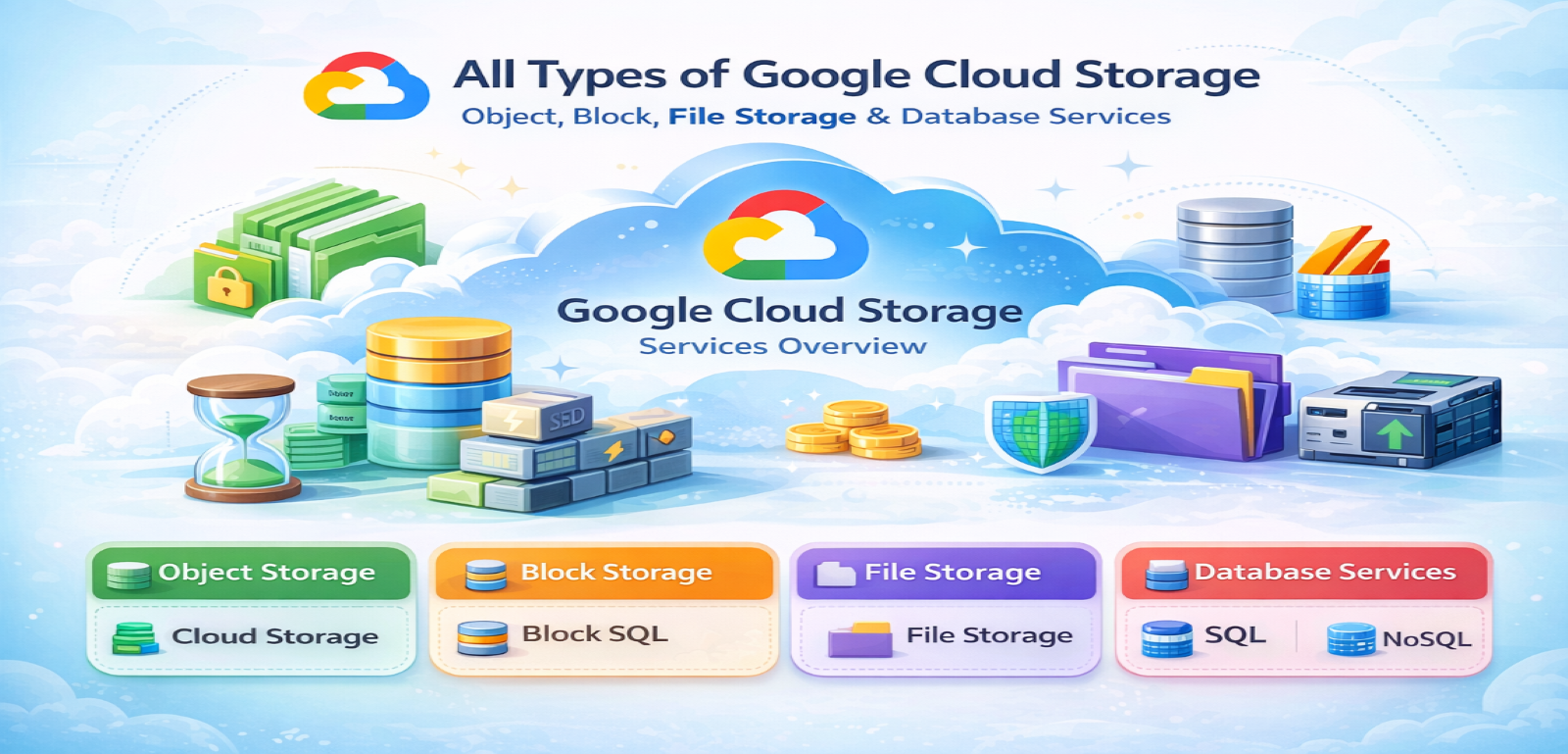
Introduction to Google Cloud Storage
Google Cloud offers a wide range of storage solutions designed to meet diverse enterprise, startup, research, and individual developer needs. These storage solutions are built for scalability, durability, security, and global accessibility.
At the core of Google Cloud’s infrastructure is:
- High durability (11 9’s or 99.999999999% for object storage)
- Global infrastructure network
- Integrated security and IAM
- Seamless integration with analytics, AI/ML, and compute services
Google Cloud categories
- Object Storage
- Block Storage
- File Storage
- Archive & Backup Storage
- Hybrid & Transfer Storage Solutions
This article presents detailed notes on each type.
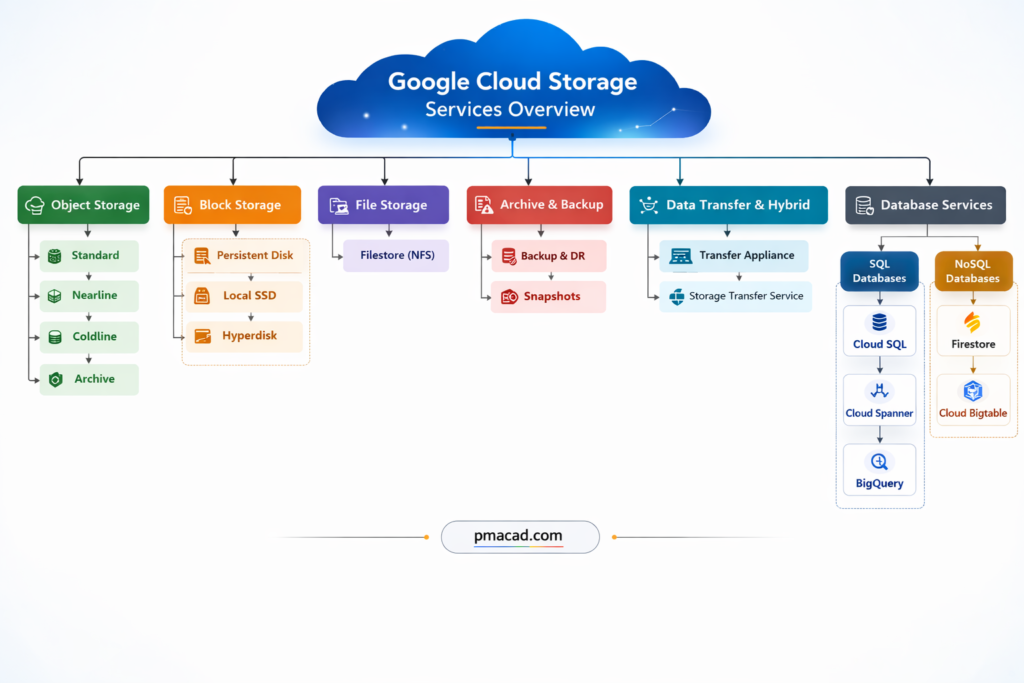
I. OBJECT STORAGE
Object storage is used for storing unstructured data such as images, videos, backups, logs, and big data files.
Object storage is a storage method where data is stored as objects, not files or blocks. Each object contains the data itself, metadata, and a unique identifier. It is called object storage because data is managed as independent objects rather than being organized in a directory hierarchy. This makes it highly scalable and ideal for unstructured data.
Object storage is designed for durability and cost efficiency rather than ultra-low latency.
Examples include storing images, videos, backups, logs, datasets, and static website content. Cloud Storage buckets are a common example of object storage.
1. Google Cloud Storage (GCS)
Google Cloud Storage is a fully managed object storage service for storing any amount of data.
Key Features
- Unlimited scalability
- 99.999999999% durability
- Strong global consistency
- Lifecycle management
- Versioning support
- Encryption at rest & in transit
- IAM integration
Storage Classes in Google Cloud Storage
Google Cloud Storage is further classified into storage classes based on access frequency:
A. Standard Storage
Best for: Frequently accessed data
Characteristics:
- Low latency
- High throughput
- No minimum storage duration
- Ideal for:
- Websites
- Streaming content
- Active analytics
- Mobile applications
Use Cases:
- Real-time applications
- Data analytics pipelines
- Machine learning datasets
B. Nearline Storage
Best for: Data accessed less than once per month
Characteristics:
- Lower storage cost than Standard
- 30-day minimum storage duration
- Millisecond access time
Use Cases:
- Monthly backups
- Disaster recovery
- Long-tail content
C. Coldline Storage
Best for: Data accessed less than once per quarter
Characteristics:
- Even lower cost
- 90-day minimum storage duration
- Millisecond access
- Retrieval fees apply
Use Cases:
- Quarterly backups
- Archived data with occasional retrieval
D. Archive Storage
Best for: Long-term archival
Characteristics:
- Lowest storage cost
- 365-day minimum storage duration
- Millisecond retrieval
- Higher retrieval cost
Use Cases:
- Compliance archives
- Medical records
- Financial record retention
- Regulatory data storage
GCS Location Types
- Regional – Single region
- Dual-Region – Two specific regions
- Multi-Region – Multiple regions within large geography
Security in GCS
- Server-side encryption (Google-managed or Customer-managed keys via Cloud KMS)
- IAM roles
- Uniform bucket-level access
- Object-level ACL (legacy option)
- VPC Service Controls
II. BLOCK STORAGE
Block storage is used for structured data and high-performance workloads like databases and VM disks.
Block storage is a type of data storage where information is broken into fixed-size chunks called blocks and stored as separate units, each with its own unique address. It is called block storage because data is not stored as files or objects, but as raw blocks that a system can read and write directly. This design makes block storage extremely fast and reliable, especially for performance-critical workloads.
Block storage is commonly used with virtual machines and databases, where low latency and high IOPS are essential.
Examples include VM disks, database volumes, and enterprise storage systems used for transactional applications.
1. Persistent Disk
Persistent Disk provides durable block storage for virtual machines in Google Compute Engine.
Types of Persistent Disk
A. Standard Persistent Disk (HDD)
- Backed by HDD
- Suitable for large sequential workloads
- Cost-effective
Use Cases:
- Batch processing
- Log processing
- Large data warehousing
B. Balanced Persistent Disk (SSD)
- SSD-based
- Balanced price/performance
- Default option
Use Cases:
- Web servers
- Small databases
- General workloads
C. SSD Persistent Disk
- High IOPS
- Low latency
- Premium performance
Use Cases:
- Transactional databases
- High-performance applications
- Enterprise systems
D. Extreme Persistent Disk
- Configurable IOPS
- Ultra-high performance
- Designed for mission-critical workloads
Use Cases:
- SAP HANA
- Large OLTP databases
Persistent Disk Features
- Snapshot support
- Automatic encryption
- Regional persistent disks for HA
- Online resizing
- Detachable and attachable
2. Local SSD
Local SSD provides high IOPS and low latency storage physically attached to VM.
Characteristics:
- Extremely fast
- Ephemeral (data lost if VM stops)
- Up to hundreds of thousands IOPS
Use Cases:
- Caching
- Scratch space
- High-speed analytics
3. Hyperdisk
Hyperdisk is next-generation block storage offering higher performance flexibility.
Types:
- Hyperdisk Balanced
- Hyperdisk Extreme
- Hyperdisk Throughput
Benefits:
- Independently scalable IOPS and throughput
- Lower latency
- Ideal for enterprise databases
III. FILE STORAGE
File storage provides shared file systems accessible by multiple clients.
File storage stores data in a hierarchical structure using files and folders, similar to a traditional file system on a computer. It is called file storage because data is accessed using file paths and filenames. Multiple users or systems can access the same files simultaneously.
File storage is commonly used when applications expect shared access to files.
Examples include shared media folders, content management systems, home directories, and application file shares. Network File System (NFS)–based storage services are typical examples of file storage.
1. Filestore
Filestore is a fully managed NFS file storage service.
Filestore is a managed file storage service that provides shared file systems for cloud-based applications. It is called Filestore because it stores data in the form of files and directories, similar to a traditional file server, and allows multiple virtual machines to access the same data simultaneously using standard file system protocols.
Filestore is commonly used when applications require shared, low-latency file access.
Use cases include content management systems, media rendering, shared application data, and enterprise workloads.
Examples include shared web content folders, home directories, and application file shares accessed via NFS.
NFS stands for Network File System. It is a file-sharing protocol that allows a computer to access files stored on another system over a network as if they were stored locally. It is called network file system because the files physically reside on a remote server but appear as part of the local file system to users and applications.
NFS enables multiple systems to read and write to the same files simultaneously.
Use cases include shared storage for applications, user home directories, media processing, and enterprise file sharing.
Examples include shared folders accessed by multiple servers, cloud file storage services, and centralized application data storage.
Key Features:
- NFSv3 support
- Fully managed
- High performance
- Integrated with Compute Engine & GKE
Service Tiers:
A. Basic Tier
- HDD or SSD
- Small workloads
B. High Scale SSD
- Enterprise-grade
- High throughput
C. Enterprise Tier
- Regional high availability
- Replicated storage
Use Cases:
- Shared web content
- Media rendering
- CMS systems
- Enterprise applications
IV. ARCHIVE & BACKUP SOLUTIONS
1. Backup and DR Service
Backup and DR Service provides centralized backup management.
Backup and disaster recovery storage is used to protect data against loss, corruption, or system failure. It stores copies of data so systems can be restored in case of accidental deletion, cyberattacks, or disasters. It is called backup storage because its primary purpose is recovery, not active use.
This storage is usually policy-based and automated.
Examples include VM backups, database backups, application-consistent snapshots, and cross-region recovery copies used during disaster recovery scenarios.
Features:
- Policy-based backups
- Application-consistent backups
- Ransomware protection
- Cross-region backup
2. Snapshot Storage
Snapshot storage stores point-in-time copies of disks or file systems. It is called a snapshot because it captures the exact state of data at a specific moment. Snapshots are usually incremental, meaning only changed data is stored, making them efficient and fast.
Snapshots are widely used for backups, cloning environments, and quick rollback operations.
Examples include VM disk snapshots before updates, database volume snapshots, and test environment cloning using production data.
Snapshots are incremental backups of:
- Persistent Disk
- Filestore
Stored in Cloud Storage backend.
3. Archive via Cloud Storage
Archive Storage class (already covered) serves as deep archive solution.
Archive storage is a low-cost storage type designed for long-term data retention that is rarely accessed. It is called archive storage because it is mainly used to store historical, compliance, or regulatory data for years. While access is slower and retrieval costs may apply, data remains highly durable and secure.
Archive storage is ideal when data must be retained but not frequently used.
Examples include financial records, audit logs, medical records, legal documents, and compliance archives stored for regulatory purposes.
V. HYBRID & DATA TRANSFER STORAGE
Data transfer and hybrid storage solutions are designed to move data between on-premises systems and the cloud, or between different cloud environments. They are called hybrid because they support mixed infrastructures. These solutions handle large-scale, secure, and scheduled data movement.
They are essential during cloud migration and ongoing data synchronization.
Examples include physical transfer devices for petabyte-scale data migration and managed services that transfer data from on-premises servers or other cloud providers into cloud storage.
1. Transfer Appliance
Transfer Appliance is a physical device used to migrate large volumes of data.
Storage Transfer Appliance is a physical data migration device used to move very large volumes of data from on-premises environments to the cloud. It is called an appliance because it is a dedicated hardware device provided by the cloud provider, which is shipped to the customer’s location. Data is copied locally onto the appliance and then securely sent back to be uploaded into cloud storage.
This approach is used when network transfer is slow, expensive, or impractical.
Examples include migrating data center archives, large media libraries, backups, and petabyte-scale datasets into cloud storage.
Use Cases:
- Data center migration
- Large-scale cloud onboarding
2. Storage Transfer Service
Storage Transfer Service automates data transfers.
Storage Transfer Service is a managed data transfer service used to move data automatically into cloud storage from on-premises systems or other cloud providers. It is called a transfer service because it handles scheduling, monitoring, retrying, and validation of data transfers without manual intervention.
The service supports one-time or recurring transfers and works over the network, making it suitable for continuous data movement.
Examples include migrating data from on-premises file servers, transferring data from other cloud storage platforms, syncing backups regularly, and automating large-scale data ingestion into cloud storage.
Supports:
- On-premises → Cloud
- AWS S3 → GCS
- Scheduled transfers
3. BigQuery Storage Integration
BigQuery integrates directly with Cloud Storage for analytics.
BigQuery Storage Integration refers to the tight integration between BigQuery and cloud object storage, allowing BigQuery to directly read and write data stored in external storage without moving or duplicating it. It is called storage integration because BigQuery treats external storage as an extension of its own storage layer.
This integration enables fast analytics on large datasets stored outside the data warehouse.
Use cases include analyzing logs, backups, data lakes, and streaming data without ingestion overhead.
Examples include querying CSV, JSON, Parquet, or Avro files stored in cloud storage directly from BigQuery using external tables or federated queries.
VI. DATABASE-ORIENTED STORAGE SERVICES
Though technically databases, these services provide structured storage:
SQL Database Storage Services
SQL database storage stores data in structured tables using rows and columns and follows a predefined schema. It is called SQL storage because it uses Structured Query Language (SQL) for data access and manipulation. This storage supports transactions, relationships, and strong consistency.
SQL storage is ideal for applications requiring structured data and ACID compliance.
Examples include transactional systems, ERP software, financial applications, and relational databases like MySQL, PostgreSQL, and distributed SQL databases.
1. Cloud SQL
Cloud SQL is a fully managed relational (SQL) database service that supports popular database engines such as MySQL, PostgreSQL, and SQL Server. It is called Cloud SQL because it brings traditional SQL-based databases to the cloud without requiring users to manage hardware, patching, or backups. Data is stored in structured tables with fixed schemas and supports ACID transactions.
Cloud SQL is ideal for applications needing familiar relational databases with moderate scalability.
Examples include web applications, CMS platforms, e-commerce systems, and business applications requiring reliable transactional storage.
Cloud SQL supports:
- MySQL
- PostgreSQL
- SQL Server
2. Cloud Spanner
Cloud Spanner is a globally distributed, horizontally scalable relational database. It is called Spanner because it “spans” data across regions while maintaining strong consistency. Unlike traditional SQL databases, it combines relational schemas with automatic scaling and global replication.
Cloud Spanner is designed for mission-critical systems requiring high availability and consistency.
Examples include global financial systems, airline reservation platforms, large-scale SaaS applications, and distributed transaction processing systems operating across multiple regions.
Cloud Spanner
- Global scale
- Strong consistency
- Horizontally scalable
3. BigQuery
BigQuery is a serverless, fully managed data warehouse designed for analyzing very large datasets using SQL. It is called a query-based database because users focus on running analytical queries rather than managing servers or storage infrastructure. Data in BigQuery is stored in a columnar format, which makes large-scale analytical queries extremely fast and cost-efficient.
BigQuery is optimized for read-heavy, analytical workloads, not transactional operations.
Examples include business intelligence reporting, log analysis, real-time analytics, data warehousing, and large-scale data analysis for machine learning and decision-making.
No SQL Database Storage Services
NoSQL database storage is designed for unstructured or semi-structured data and does not rely on fixed schemas. It is called NoSQL because it supports non-relational data models such as key-value, document, wide-column, or graph storage. This makes it highly scalable and flexible.
NoSQL storage is commonly used for large-scale, high-throughput applications.
Examples include real-time analytics, IoT data, user profiles, time-series data, and mobile or web applications requiring massive scalability.
1. Firestore
Firestore is a NoSQL document-oriented database designed for building scalable web and mobile applications. It is called a document database because data is stored in documents organized into collections, rather than rows and tables. Each document can store flexible, JSON-like data structures, making it easy to evolve application schemas.
Firestore supports real-time data synchronization and automatic scaling.
Examples include chat applications, real-time dashboards, user profiles, mobile app backends, gaming leaderboards, and applications requiring live updates across devices.
Firestore
- Document-based
- Real-time sync
- Serverless
2. Bigtable
Bigtable is a NoSQL wide-column database built for extremely large-scale, high-throughput workloads. It is called a wide-column store because data is organized into rows and column families, allowing billions of rows and thousands of columns per row. This structure enables fast reads and writes at massive scale.
Bigtable is optimized for low-latency access to large datasets.
Examples include time-series data, IoT sensor data, financial tick data, monitoring systems, and analytics platforms requiring high performance and scalability.
Cloud Bigtable
- High throughput
- Time-series workloads
- IoT data
VII. COMPARISON TABLE
| Category | Service | Best For | Persistence | Access Pattern |
|---|---|---|---|---|
| Object | Cloud Storage Standard | Frequent access | Durable | Low latency |
| Object | Nearline | Monthly access | Durable | Low-medium |
| Object | Coldline | Quarterly | Durable | Low |
| Object | Archive | Rare access | Durable | Retrieval fee |
| Block | Persistent Disk | VM workloads | Durable | Low latency |
| Block | Local SSD | Cache | Ephemeral | Ultra-low |
| Block | Hyperdisk | Enterprise DB | Durable | Configurable |
| File | Filestore | Shared FS | Durable | NFS |
| Transfer | Transfer Appliance | Bulk migration | Temporary | Physical |
| Transfer | Storage Transfer | Automated migration | Durable | Scheduled |
VIII. PERFORMANCE & COST CLASSIFICATION
Based on Performance:
- Ultra High Performance:
- Local SSD
- Hyperdisk Extreme
- SSD Persistent Disk
- Moderate Performance:
- Balanced Persistent Disk
- Standard Storage
- Low-Cost Archival:
- Coldline
- Archive
Based on Access Frequency:
| Access Pattern | Recommended Storage |
|---|---|
| Real-time | Standard |
| Monthly | Nearline |
| Quarterly | Coldline |
| Yearly | Archive |
IX. SECURITY & COMPLIANCE ACROSS STORAGE SERVICES
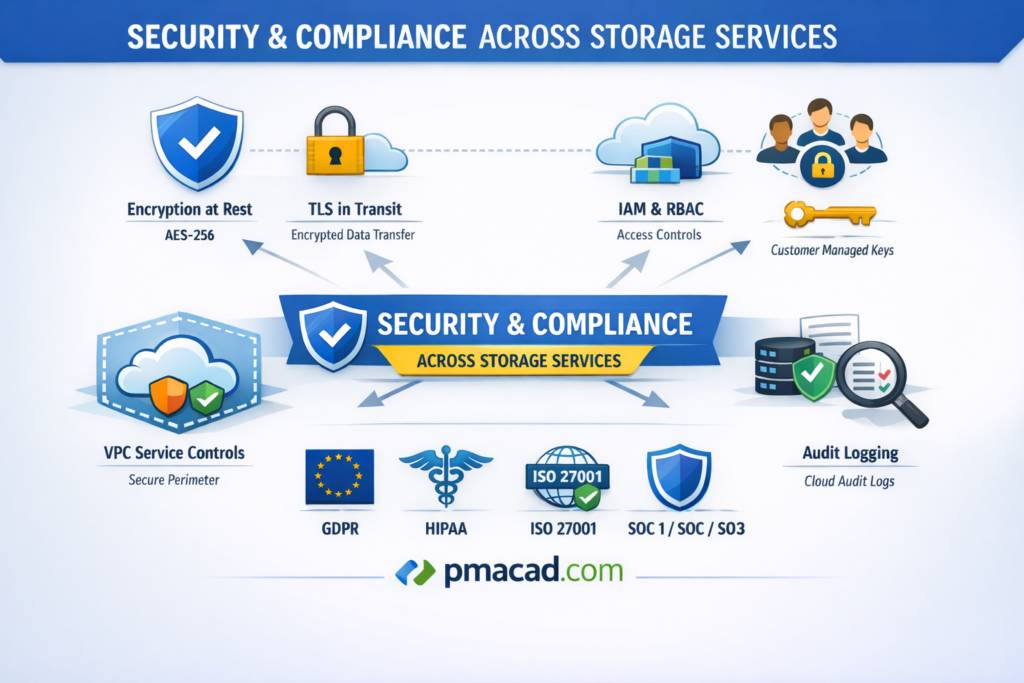
Common Security Features:
Encryption at Rest (AES-256)
All stored data is automatically encrypted using AES-256 while residing on disk. This protects data from unauthorized access even if physical storage devices are compromised.
TLS in Transit
Data is encrypted using TLS while moving between users, services, and storage systems. This prevents eavesdropping, man-in-the-middle attacks, and unauthorized interception during network communication.
IAM & RBAC
Identity and Access Management with role-based access control ensures only authorized users and services can access storage resources, enforcing least-privilege access across the organization.
CMEK (Customer Managed Encryption Keys)
Customer Managed Encryption Keys allow organizations to control, rotate, disable, and audit encryption keys, providing enhanced security and compliance for sensitive or regulated data.
VPC Service Controls
VPC Service Controls create security perimeters around storage services, reducing data exfiltration risks by restricting access to trusted networks and approved identities only.
Audit Logging via Cloud Audit Logs
Cloud Audit Logs record all administrative and data access activities, enabling security monitoring, compliance reporting, forensic analysis, and detection of suspicious or unauthorized actions.
Compliance:
GDPR (General Data Protection Regulation)
GDPR is a European data protection law that governs how personal data is collected, stored, processed, and transferred, ensuring privacy rights, data security, and user consent.
HIPAA (Health Insurance Portability and Accountability Act)
HIPAA is a U.S. regulation that protects sensitive healthcare information by enforcing strict security, privacy, and access controls for electronic protected health information (ePHI).
ISO 27001
ISO 27001 is an international standard for information security management systems, ensuring organizations systematically manage data security risks through policies, controls, and continuous improvement.
SOC 1 / SOC 2 / SOC 3
SOC reports evaluate an organization’s internal controls. SOC 1 focuses on financial reporting, SOC 2 on security and trust principles, and SOC 3 provides public assurance.
X. ARCHITECTURAL BEST PRACTICES
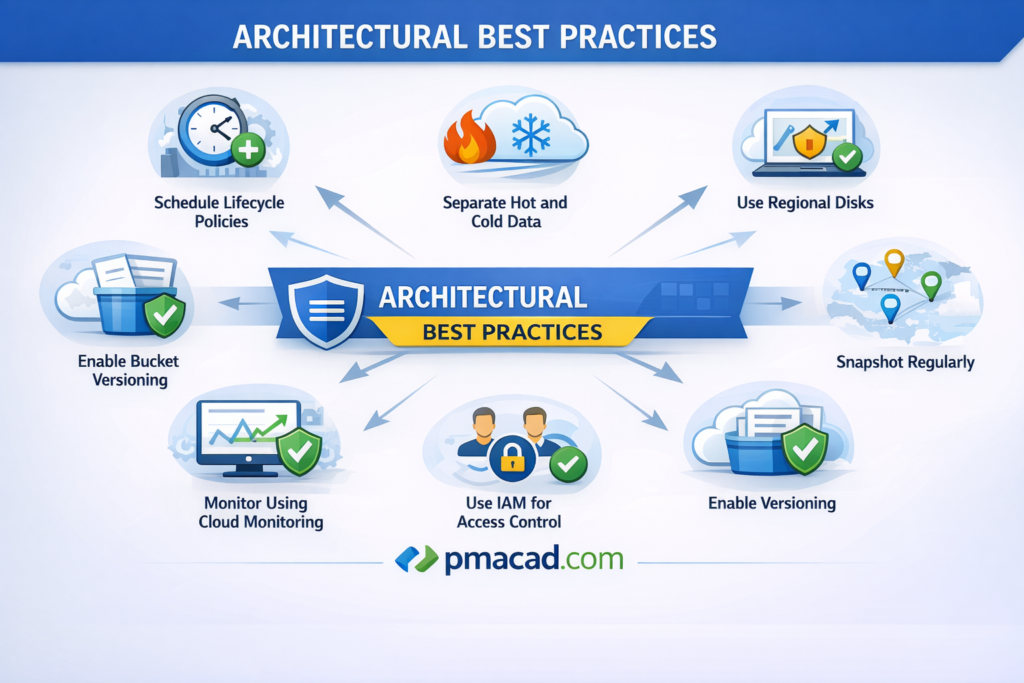
1. Use Lifecycle Policies to Reduce Cost
Lifecycle policies automatically move data between storage classes or delete it based on age, access patterns, or conditions. By transitioning infrequently accessed data from hot storage to cold or archive storage, organizations significantly reduce costs. Lifecycle rules also prevent unnecessary storage growth by removing obsolete data, backups, or temporary files without manual intervention.
2. Separate Hot and Cold Data
Hot data is frequently accessed and requires low latency, while cold data is rarely accessed and can tolerate higher retrieval time. Separating these datasets allows organizations to store hot data in high-performance storage and cold data in low-cost archival storage. This strategy optimizes performance while minimizing unnecessary spending on expensive storage tiers.
3. Use Regional Disks for High Availability
Regional disks replicate data synchronously across multiple zones within a region. This ensures that applications continue running even if one zone fails. Using regional disks improves fault tolerance and availability without requiring complex manual replication. They are especially important for critical workloads such as databases and enterprise applications that require continuous uptime.
4. Snapshot Regularly
Regular snapshots capture point-in-time copies of disks or file systems, enabling quick recovery from data corruption, accidental deletion, or failed updates. Since snapshots are incremental, they are storage-efficient and fast. Automating snapshots ensures consistent protection and simplifies disaster recovery planning for both development and production environments.
5. Enable Versioning for Critical Buckets
Bucket versioning preserves older versions of objects when they are overwritten or deleted. This provides protection against accidental changes, data loss, or ransomware attacks. Enabling versioning is especially useful for critical data such as configuration files, source data, and backups, as it allows easy rollback to previous versions.
6. Use IAM Instead of Object ACLs
Identity and Access Management (IAM) provides centralized, consistent, and scalable access control across storage resources. Using IAM instead of object-level ACLs simplifies permission management, reduces misconfigurations, and improves security. IAM also integrates with organizational policies, auditing, and role-based access control, making it more suitable for enterprise environments.
7. Monitor Using Cloud Monitoring
Cloud Monitoring provides visibility into storage performance, usage, latency, and errors. By monitoring metrics and setting alerts, teams can detect issues early, optimize performance, and control costs. Continuous monitoring helps identify unusual access patterns, storage growth trends, and potential failures, ensuring reliable and efficient storage operation

Sumit is the creator & author at pmacad.com, where he writes about project management, technology, and modern delivery practices. He brings over a decade of experience across technology projects and delivery leadership.